Saturday, July 27, 2013

Saturday, July 6, 2013
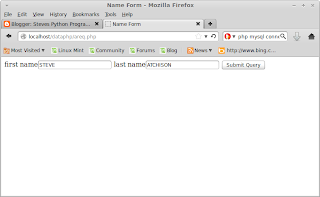
I DID IT!
I made an HTML form and then used PHP to get the data from it, and store the data into a SQL database! This is so cool!


Wednesday, July 3, 2013
SWITCHED FROM PYTHON TO PHP!

Saturday, May 25, 2013
have to change this blog to Steve's PHP programing adventures!
I created an HTML5 file and put it in /var/www. It works! I added a video to a web page and opened it up under localhost! I need a php blog now.


Saturday, May 11, 2013
MY DRAWING PROGRAM

#!/usr/bin/python
from Tkinter import *
#Written by Steve Atchison for Shawnee County, May 11 2013
#Create lines
def deletelines():
w.delete(ALL)
quarterquarters()
def vline330():
w.create_line(50,0,50,50,tag='v330')
w.create_text(35, 25, text='330', tag='v330')
def hline330():
w.create_line(0,50,50,50,tag='h330')
w.create_text(23, 43, text='330', tag='h330')
def vline660():
w.create_line(100,0,100,100,tag='v660')
w.create_text(85, 50, text='660', tag='v660')
def hline660():
w.create_line(0,100,100,100,tag='h660')
w.create_text(50, 90, text='660', tag='h660')
def vline1320():
w.create_line(200,0,200,200,tag='v1320')
w.create_text(180,100,text='1320', tag='v1320')
def hline1320():
w.create_line(0,200,200,200,tag='h1320')
w.create_text(100,190,text='1320', tag='h1320')
#quarter section menu
def qmenu():
qtop=Toplevel(root)
qtop.geometry('160x120')
qtop.config(bg='magenta')
qtop.title('1/4 section menu')
qbtn=Button(qtop, text='SW Quarter', command=swqlines)
qbtn.pack()
qbtn2=Button(qtop, text='SE Quarter',command=seqlines)
qbtn2.pack()
qbtn3=Button(qtop, text='NW Quarter', command=nwqlines)
qbtn3.pack()
qbtn4=Button(qtop, text='NE Quarter', command=neqlines)
qbtn4.pack()
#Move lines
def mv1320horzwest():
w.move('h1320', -100, 0)
def mv1320up():
w.move('v1320', 0, -100)
def mv1320right():
w.move('v1320',50,0)
def mv1320left():
w.move('v1320',-50,0)
def mv1320down():
w.move('v1320',0,200)
def mv1320horzdown():
w.move('h1320',0,50)
def mv1320horzeast():
w.move('h1320',200,0)
def mv1320horzup():
w.move('h1320',0,-50)
def win1320():
top1=Toplevel(root)
top1.geometry('250x200')
top1.title('1320 lines')
top1.config(bg='green')
frame1=Frame(top1)
frame1.pack(side=LEFT)
frame2=Frame(top1)
frame2.pack(side=RIGHT)
btn1=Button(frame1,text='1320 vertical ',command=vline1320)
btn1.pack()
btn2=Button(frame2,text='1320 horizontal',command=hline1320)
btn2.pack()
mvbtn10=Button(frame1, text='NORTH', command=mv1320up)
mvbtn10.pack()
mvbtn3=Button(frame1, text='SOUTH', command=mv1320down)
mvbtn3.pack()
mvbtn1=Button(frame1,text='EAST',command=mv1320right)
mvbtn1.pack()
mvbtn2=Button(frame1,text='WEST',command=mv1320left)
mvbtn2.pack()
mvbtn6=Button(frame2, text='NORTH',command=mv1320horzup)
mvbtn6.pack()
mvbtn5=Button(frame2,text='SOUTH',command=mv1320horzdown)
mvbtn5.pack()
mvbtn4=Button(frame2,text='EAST',command=mv1320horzeast)
mvbtn4.pack()
mvbtn11=Button(frame2, text='WEST', command=mv1320horzwest)
mvbtn11.pack()
def quarterquarters():
w.create_line(200,400,200,0, fill='blue')
w.create_line(0,200,400,200, fill='blue')
w.create_line(100,0,100,400,dash=(3,5),fill='gray')
w.create_line(300,0,300,400,dash=(3,5),fill='gray')
w.create_line(0,100,400,100,dash=(3,5),fill='gray')
w.create_line(0,300,400,300,dash=(3,5),fill='gray')
def move660right():
w.move('v660', 50, 0)
def move660down():
w.move('v660', 0, 50)
def move660up():
w.move('v660', 0, -25)
def move660left():
w.move('v660',-50,0)
def move330right():
w.move('v330',25, 0)
def move330down():
w.move('v330',0,25)
def move330up():
w.move('v330',0,-25)
def move330west():
w.move('v330', -25, 0)
def movehorz330east():
w.move('h330',50, 0)
def movehorz330down():
w.move('h330', 0, 50)
def movehorz660west():
w.move('h660', -50, 0)
def movehorz330up():
w.move('h330', 0,-25)
def movehorz330west():
w.move('h330', -25, 0)
def movehorz660east():
w.move('h660', 50, 0)
def movehorz660down():
w.move('h660', 0, 50)
def movehorz660up():
w.move('h660', 0,-50)
def win660():
top2=Toplevel(root)
top2.geometry('250x200')
top2.title('660 lines')
top2.config(bg='blue')
frame1=Frame(top2)
frame1.pack(side=LEFT)
frame2=Frame(top2)
frame2.pack(side=RIGHT)
btn1=Button(frame1,text='660 vertical ',command=vline660)
btn1.pack()
btn2=Button(frame2,text='660 horizontal',command=hline660)
btn2.pack()
mvbt4=Button(frame1, text='NORTH', command=move660up)
mvbt4.pack()
mvbt2=Button(frame1,text='SOUTH',command=move660down)
mvbt2.pack()
mvbt=Button(frame1,text='EAST',command=move660right)
mvbt.pack()
mvbt3=Button(frame1,text='WEST',command=move660left)
mvbt3.pack()
mvbt6=Button(frame2, text='NORTH', command=movehorz660up)
mvbt6.pack()
mvbt5=Button(frame2, text='SOUTH', command=movehorz660down)
mvbt5.pack()
mvbt4=Button(frame2, text='EAST', command=movehorz660east)
mvbt4.pack()
mvbt7=Button(frame2, text='WEST', command=movehorz660west)
mvbt7.pack()
dimbtn1=Button(frame1, text='Dim Vertical', command=dimvert660)
dimbtn1.pack()
dimbtn2=Button(frame2, text='Dim Horizontal', command=dimhorz660)
dimbtn2.pack()
def win330():
top2=Toplevel(root)
top2.geometry('250x200')
top2.title('330 lines')
top2.config(bg='pink')
frame1=Frame(top2)
frame1.pack(side=LEFT)
frame2=Frame(top2)
frame2.pack(side=RIGHT)
btn1=Button(frame1,text='330 vertical ',command=vline330)
btn1.pack()
btn2=Button(frame2,text='330 horizontal',command=hline330)
btn2.pack()
mvbt8=Button(frame1, text='NORTH', command=move330up)
mvbt8.pack()
mvbt2=Button(frame1,text='SOUTH',command=move330down)
mvbt2.pack()
mvbt=Button(frame1,text='EAST',command=move330right)
mvbt.pack()
mvbt3=Button(frame1,text='WEST',command=move330west)
mvbt3.pack()
mvbt6=Button(frame2, text='NORTH', command=movehorz330up)
mvbt6.pack()
mvbt5=Button(frame2, text='SOUTH', command=movehorz330down)
mvbt5.pack()
mvbt4=Button(frame2, text='EAST', command=movehorz330east)
mvbt4.pack()
mvbt7=Button(frame2, text='WEST', command=movehorz330west)
mvbt7.pack()
dimbtn1=Button(frame1, text='Dim Vertical', command=dimvert330)
dimbtn1.pack()
dimbtn2=Button(frame2, text='Dim Horizontal', command=dimhorz330)
dimbtn2.pack()
def unknown(): #This is the find unknownside window
def clearGUI():
knownside.delete(0,END)
acres.delete(0,END)
def calcit():
unknownside= (float(acres.get())*float(43560))/float(knownside.get())
textwin.delete('1.0',END) #clear the text widget before adding new text
textwin.insert('1.0','Acres = '+ acres.get()+'\nknown side = '+ knownside.get()+ '\nUnknown side = ' + str(round(unknownside,2))+'\n')
clearGUI()
top=Toplevel(root)
top.geometry('250x175')
top.config(bg='violet')
lbl = Label(top,text='Known side')
lbl.pack()
knownside = Entry(top)
knownside.pack()
lbl2= Label(top,text='Acres')
lbl2.pack()
acres = Entry(top)
acres.pack()
calcbtn = Button(top,text='Calc',command= calcit)
calcbtn.pack()
textwin = Text(top)
textwin.pack()
def labelquarters():
w.create_text(100,100, text='1/4,1/4')
#Draw quarter section lines
def swqlines():
deletelines()
quarterquarters()
w.create_line(0, 0, 0 , 400, width=7)
w.create_line(0, 400, 400, 399, width=6)
w.create_text(200, 200,text='SW 1/4', fill='red', font=('Helvitica', '10'))
w.create_text(100, 120, text= 'NW 1/4, SW 1/4', fill='red', font=('Helvtica', '6'))
w.create_text(300, 120, text='NE 1/4, SW 1/4', fill='red', font=('Helvtica', '6'))
w.create_text(100, 320, text='SW 1/4, SW,1/4', fill='red', font=('Helvtica', '6'))
w.create_text(300, 320, text='SE 1/4, SW 1/4', fill='red', font=('Helvtica', '6'))
def seqlines():
deletelines()
quarterquarters()
w.create_line(400,0, 400, 400, width=5)
w.create_line(0,400, 400, 400, width=6)
w.create_text(200, 200, text='SE 1/4', fill='red', font=('Helvtica', '10'))
w.create_text(100, 120, text= 'NW 1/4, SE 1/4', fill='red', font=('Helvtica', '6'))
w.create_text(300, 120, text='NE 1/4, SE 1/4', fill='red', font=('Helvtica', '6'))
w.create_text(100, 320, text='SW 1/4, SE,1/4', fill='red', font=('Helvtica', '6'))
w.create_text(300, 320, text='SE 1/4, SE 1/4', fill='red', font=('Helvtica', '6'))
def nwqlines():
deletelines()
quarterquarters()
w.create_line(0,0, 400,0, width=7)
w.create_line(0,0, 0, 400, width=7)
w.create_text(200, 200, text='NW 1/4', fill='red', font=('Helvtica', '10'))
w.create_text(100, 120, text= 'NW 1/4, NW 1/4', fill='red', font=('Helvtica', '6'))
w.create_text(300, 120, text='NE 1/4,NW 1/4', fill='red', font=('Helvtica', '6'))
w.create_text(100, 320, text='SW 1/4,NW,1/4', fill='red', font=('Helvtica', '6'))
w.create_text(300, 320, text='SE 1/4, NW 1/4', fill='red', font=('Helvtica', '6'))
def neqlines():
deletelines()
quarterquarters()
w.create_line(0,0, 400,0, width=7)
w.create_line(400,0, 400, 400, width=7)
w.create_text(200, 200, text='NE 1/4', fill='red', font=('Helvtica', '10'))
w.create_text(100, 120, text= 'NW 1/4, NE 1/4', fill='red', font=('Helvtica', '6'))
w.create_text(300, 120, text='NE 1/4,NE 1/4', fill='red', font=('Helvtica', '6'))
w.create_text(100, 320, text='SW 1/4,NE,1/4', fill='red', font=('Helvtica', '6'))
w.create_text(300, 320, text='SE 1/4, NE 1/4', fill='red', font=('Helvtica', '6'))
root=Tk()
root.title('Quarter Section 2640 x 2640')
root.config(bg='yellow')
root.geometry('430x440')
w = Canvas(root,width=400,height=400,bg='white')
w.pack()
frame330=Frame(root)
frame330.pack(side=RIGHT)
frame660=Frame(root)
frame660.pack(side=RIGHT)
frame1320=Frame(root)
frame1320.pack(side=RIGHT)
frame1=Frame(root)
frame1.pack(side=LEFT)
delbtn=Button(frame1,text='clear lines',command=deletelines)
delbtn.pack(side=TOP)
btn1=Button(root, text='Unknown side', command=unknown)
btn1.pack(padx=4,pady=4)
btn7=Button(frame660,text='660',command=win660)
btn7.pack()
btn4=Button(frame1320,text='1320',command=win1320)
btn4.pack()
btn2=Button(frame330, text='330', command=win330)
btn2.pack()
qmenu()
root.mainloop()
Saturday, April 6, 2013
HOW TO PLAY MUSIC USING PYTHON AND PYGAME!
import pygame.mixer
sounds= pygame.mixer
sounds.init()
def wait_finish(channel):
while channel.get_busy():
pass
s = sounds.Sound("yourlove.ogg")
wait_finish(s.play())
sounds= pygame.mixer
sounds.init()
def wait_finish(channel):
while channel.get_busy():
pass
s = sounds.Sound("yourlove.ogg")
wait_finish(s.play())
Sunday, March 31, 2013
My first Server written in Python
This is my first successful server program written in Python. This helps me understand how servers and clients work. Firefox would not hook-up, but Chromium worked just fine. Typed "localhost:1088" in my browser and the sever sent a small html file back.


Subscribe to:
Posts (Atom)

